
Step 1: Check Whether You Already Have One
Paste your website into the Feed Finder. If it finds a feed, skip to step 4. Most platforms create one automatically:
| Platform | Feed address or setting |
|---|---|
| WordPress | Automatic at /feed/, plus feeds per category, tag, author and comments. |
| Ghost | Automatic at /rss/. |
| Substack, Medium, Blogger, Tumblr | Automatic; see the platform cheat sheet in the Feed Finder. |
| Shopify | Blogs have an Atom feed at /blogs/BLOG-HANDLE.atom. |
| Squarespace | Add ?format=rss to the URL of a blog page. |
| Wix | Wix Blog publishes /blog-feed.xml. |
| Webflow | Enable the RSS feed option on a CMS collection. |
| Drupal | The front page feed is at /rss.xml; create others with Views. |
| Joomla | Add ?format=feed&type=rss to a category or blog page. |
Static Site Generators
| Generator | How |
|---|---|
| Hugo | Built in: /index.xml for the site and every section. |
| Jekyll | The jekyll-feed plugin creates an Atom feed at /feed.xml. |
| Eleventy | The official @11ty/eleventy-plugin-rss plugin. |
| Astro | The @astrojs/rss package and an rss.xml.js endpoint. |
| Next.js | Generate the XML in a route handler or at build time, for example with the feed package. |
| Gatsby | gatsby-plugin-feed. |
| Docusaurus | Blog feeds are built in (/blog/rss.xml and /blog/atom.xml). |
| Hexo | hexo-generator-feed. |
| Zola | A config option generates an Atom or RSS feed. |
| MkDocs | mkdocs-rss-plugin. |
Step 2: Make a Feed by Hand
For a small site, a landing page or a podcast with a few episodes, a static file is enough. Fill in the Feed Generator, download feed.xml and upload it to your site. Update it when you publish something new, putting the newest item at the top.
Step 3: Generate the Feed with Code
For a custom site, generate the feed from your database. The rules are the same in every language: escape text, wrap HTML in CDATA, use absolute URLs, format dates correctly, and send the right headers.
PHP
<?php
$pdo = new PDO('mysql:host=localhost;dbname=site;charset=utf8mb4', 'user', 'secret');
$posts = $pdo->query('SELECT title, slug, summary, body, author, published_at
    FROM posts WHERE published = 1 ORDER BY published_at DESC LIMIT 20')->fetchAll(PDO::FETCH_ASSOC);

$base = 'https://example.com';
$x = fn($s) => htmlspecialchars($s, ENT_XML1 | ENT_QUOTES, 'UTF-8');
$cdata = fn($s) => '<![CDATA[' . str_replace(']]>', ']]]]><![CDATA[>', $s) . ']]>';
$last = $posts ? strtotime($posts[0]['published_at']) : time();
$lastHttp = gmdate('D, d M Y H:i:s', $last) . ' GMT';

if (($_SERVER['HTTP_IF_MODIFIED_SINCE'] ?? '') === $lastHttp) { http_response_code(304); exit; }
header('Content-Type: application/rss+xml; charset=utf-8');
header('Last-Modified: ' . $lastHttp);
header('Cache-Control: public, max-age=900');

echo '<?xml version="1.0" encoding="UTF-8"?>', "\n";
?>
<rss version="2.0" xmlns:atom="http://www.w3.org/2005/Atom" xmlns:content="http://purl.org/rss/1.0/modules/content/" xmlns:dc="http://purl.org/dc/elements/1.1/">
<channel>
  <title>Example Blog</title>
  <link><?= $base ?>/</link>
  <description>Notes about the web.</description>
  <atom:link href="<?= $base ?>/feed.xml" rel="self" type="application/rss+xml" />
  <language>en</language>
  <lastBuildDate><?= date(DATE_RSS, $last) ?></lastBuildDate>
<?php foreach ($posts as $p): $url = $base . '/posts/' . rawurlencode($p['slug']); ?>
  <item>
    <title><?= $x($p['title']) ?></title>
    <link><?= $x($url) ?></link>
    <guid isPermaLink="true"><?= $x($url) ?></guid>
    <pubDate><?= date(DATE_RSS, strtotime($p['published_at'])) ?></pubDate>
    <dc:creator><?= $x($p['author']) ?></dc:creator>
    <description><?= $cdata($p['summary']) ?></description>
    <content:encoded><?= $cdata($p['body']) ?></content:encoded>
  </item>
<?php endforeach; ?>
</channel>
</rss>
Make it available at a friendly address with a rewrite rule, for example in .htaccess: RewriteRule ^feed\.xml$ feed.php [L]. Make sure nothing – not even a blank line – is output before <?xml.
Node.js (Express)
import express from 'express';
const app = express();
const esc = s => String(s).replace(/[&<>"']/g, c => ({'&': '&', '<': '<', '>': '>', '"': '"', "'": '''}[c]));
const cdata = s => `<![CDATA[${String(s).replaceAll(']]>', ']]]]><![CDATA[>')}]]>`;
app.get('/feed.xml', async (req, res) => {
const posts = await db.latestPosts(20);
const items = posts.map(p => {
const url = `https://example.com/posts/${encodeURIComponent(p.slug)}`;
return `
<item>
<title>${esc(p.title)}</title>
<link>${esc(url)}</link>
<guid isPermaLink="true">${esc(url)}</guid>
<pubDate>${new Date(p.publishedAt).toUTCString()}</pubDate>
<description>${cdata(p.summary)}</description>
</item>`;
}).join('');
res.type('application/rss+xml').set('Cache-Control', 'public, max-age=900').send(`<?xml version="1.0" encoding="UTF-8"?>
<rss version="2.0" xmlns:atom="http://www.w3.org/2005/Atom">
<channel>
<title>Example Blog</title>
<link>https://example.com/</link>
<description>Notes about the web.</description>
<atom:link href="https://example.com/feed.xml" rel="self" type="application/rss+xml" />${items}
</channel>
</rss>`);
});Python (Flask)
from email.utils import format_datetime
from xml.sax.saxutils import escape
from flask import Flask, Response

app = Flask(__name__)

def cdata(s):
    return '<![CDATA[' + s.replace(']]>', ']]]]><![CDATA[>') + ']]>'

@app.route('/feed.xml')
def feed():
    posts = get_latest_posts(20)
    items = ''.join(f'''
    <item>
      <title>{escape(p.title)}</title>
      <link>https://example.com/posts/{p.slug}</link>
      <guid isPermaLink="true">https://example.com/posts/{p.slug}</guid>
      <pubDate>{format_datetime(p.published_at)}</pubDate>
      <description>{cdata(p.summary)}</description>
    </item>''' for p in posts)
    xml = f'''<?xml version="1.0" encoding="UTF-8"?>
<rss version="2.0" xmlns:atom="http://www.w3.org/2005/Atom">
  <channel>
    <title>Example Blog</title>
    <link>https://example.com/</link>
    <description>Notes about the web.</description>
    <atom:link href="https://example.com/feed.xml" rel="self" type="application/rss+xml" />{items}
  </channel>
</rss>'''
    return Response(xml, mimetype='application/rss+xml')
format_datetime needs a time-zone-aware datetime to produce a correct offset. Prefer a library? Use feedgen in Python, feed in Node.js, or laminas-feed in PHP.
Step 4: Announce the Feed
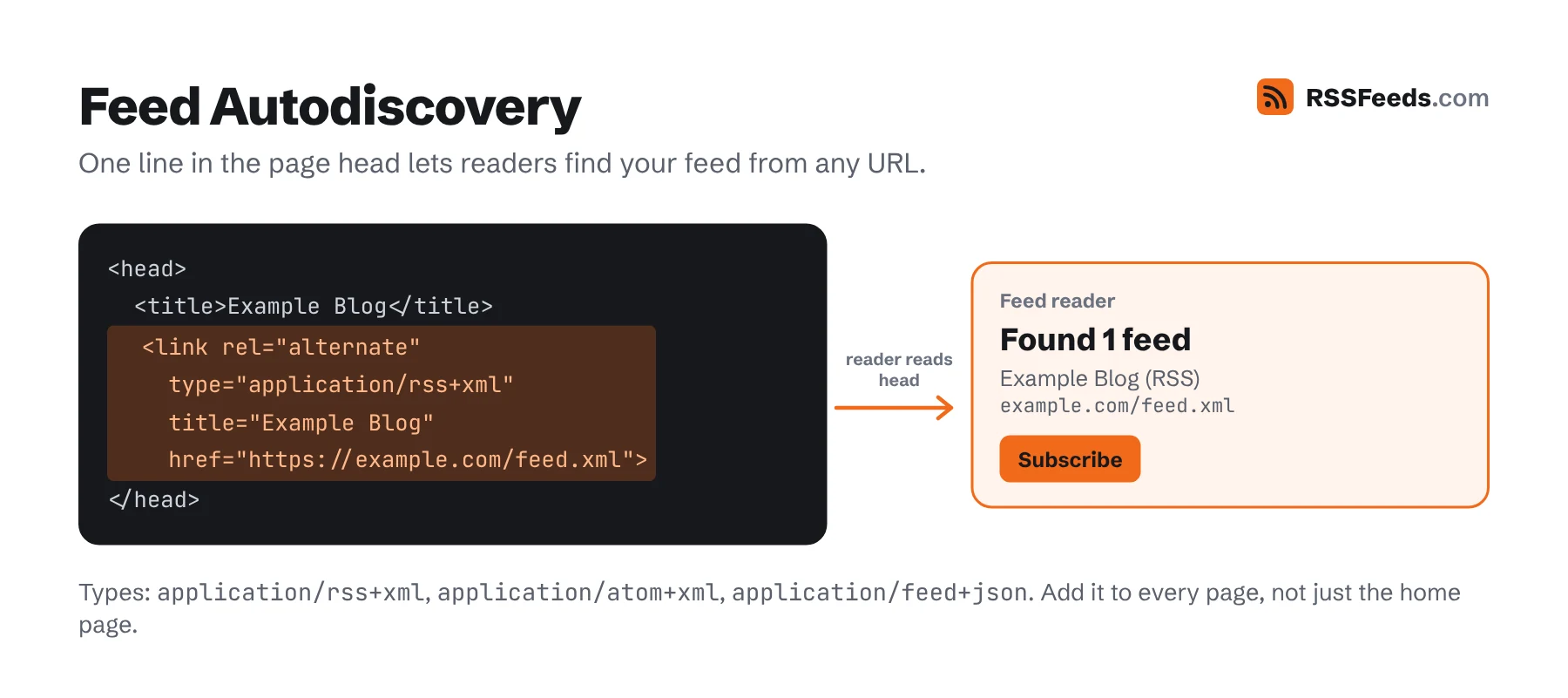
Add autodiscovery tags to the <head> of every page, so readers and browser extensions find the feed when someone pastes your site address:
<link rel="alternate" type="application/rss+xml" title="Example Blog" href="https://example.com/feed.xml">
<link rel="alternate" type="application/atom+xml" title="Example Blog (Atom)" href="https://example.com/atom.xml">
<link rel="alternate" type="application/feed+json" title="Example Blog (JSON)" href="https://example.com/feed.json">
Also link to it visibly – a "Subscribe via RSS" link in the footer or next to your newsletter form helps people who don't know they can paste a site address into a reader.
Step 5: Validate and Test
- Run the feed through the Feed Validator and fix every error.
- Open it in the Feed Viewer to see how readers will display it.
- Subscribe in two different readers and publish a test post to see it arrive.
Then read the best practices to make it fast, reliable and friendly to every reader.
Sources and Further Reading
- WordPress FeedsWordPress Developer Resources
- RSS TemplatesHugo
- jekyll-feedJekyll
- feed (npm package)npm
- python-feedgenfeedgen
- RSS 2.0 SpecificationRSS Advisory Board