The Quick Answer
Paste the channel URL or @handle into the Feed Finder. It looks up the channel ID and gives you three feeds: all uploads, videos without Shorts, and Shorts only. To build the URL yourself:
https://www.youtube.com/feeds/videos.xml?channel_id=UCxxxxxxxxxxxxxxxxxxxxxx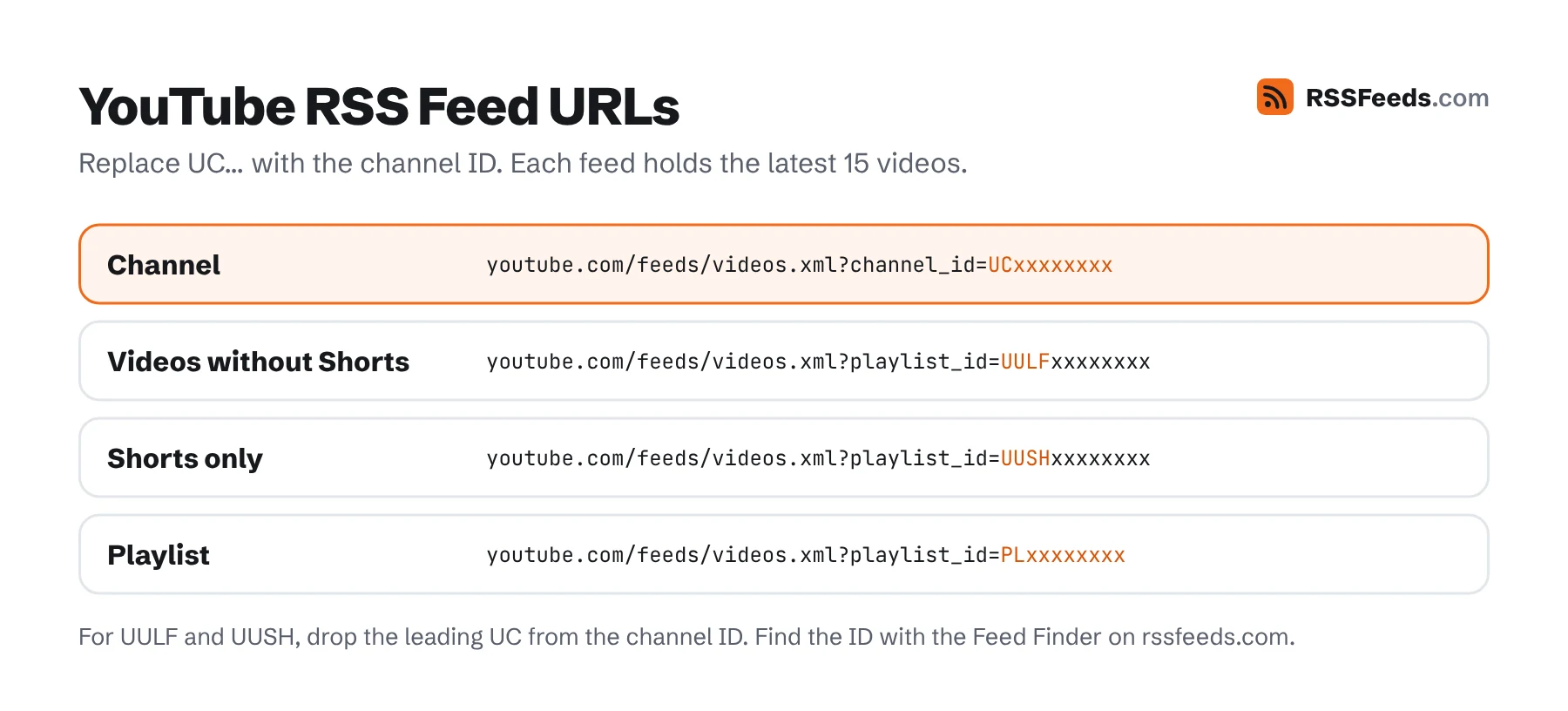
All YouTube Feed URL Formats
| Feed | URL |
|---|---|
| All uploads of a channel | https://www.youtube.com/feeds/videos.xml?channel_id=CHANNEL_ID |
| Videos without Shorts | https://www.youtube.com/feeds/videos.xml?playlist_id=UULF + channel ID without UC |
| Shorts only | https://www.youtube.com/feeds/videos.xml?playlist_id=UUSH + channel ID without UC |
| A playlist | https://www.youtube.com/feeds/videos.xml?playlist_id=PLAYLIST_ID |
| Legacy username | https://www.youtube.com/feeds/videos.xml?user=USERNAME (only for old channels with a username) |
Example: the channel ID UCsXVk37bltHxD1rDPwtNM8Q becomes UULFsXVk37bltHxD1rDPwtNM8Q for videos without Shorts: replace the first two characters, UC, with UULF.
How to Find a YouTube Channel ID
Channel IDs are 24 characters long and always start with UC. Channel pages today mostly use @handles, so you may need to look the ID up:
- Use the Feed Finder. Paste
https://www.youtube.com/@handle; the finder reads the ID from the channel page. - From the channel page. Open the channel, click the description ("more about this channel"), choose Share channel and then Copy channel ID.
- From the page source. On the channel page, view the source and search for
channel_id=or"channelId". The channel page itself also contains an RSS autodiscovery link. - From an old URL. Links like
youtube.com/channel/UC…contain the ID directly.
What's in a YouTube Feed
YouTube feeds are Atom feeds. Each holds the latest 15 videos with:
- the video title, link, publication and update date, and the channel name;
yt:videoIdandyt:channelIdelements;- a
media:groupwith the thumbnail, the full description and view and rating statistics (Media RSS).
<entry>
  <id>yt:video:dQw4w9WgXcQ</id>
  <yt:videoId>dQw4w9WgXcQ</yt:videoId>
  <yt:channelId>UCxxxxxxxxxxxxxxxxxxxxxx</yt:channelId>
  <title>Video title</title>
  <link rel="alternate" href="https://www.youtube.com/watch?v=dQw4w9WgXcQ"/>
  <published>2026-11-10T15:00:00+00:00</published>
  <updated>2026-11-11T08:12:43+00:00</updated>
  <media:group>
    <media:title>Video title</media:title>
    <media:thumbnail url="https://i.ytimg.com/vi/dQw4w9WgXcQ/hqdefault.jpg" width="480" height="360"/>
    <media:description>The full video description…</media:description>
  </media:group>
</entry>
Open any channel feed in the Feed Viewer to see it with thumbnails and descriptions.
Why Follow YouTube with RSS?
- You see every upload. YouTube's subscription feed and notifications don't show everything; the RSS feed does.
- No recommendations. Just the channels you chose, in order, without autoplay.
- Without Shorts. The UULF feed shows only regular videos.
- Without an account. No sign-in needed; nothing is tied to your Google profile.
- Next to everything else. Videos appear in the same reader as your blogs, newsletters and podcasts.
Using YouTube Feeds in Practice
In a Feed Reader
Most readers, including Feedly, Inoreader, NewsBlur and NetNewsWire, accept a channel URL directly and convert it to the feed. If yours doesn't, paste the feed URL. Put video channels in their own folder and use the card or magazine view so thumbnails show.
Automations
Because the feed is standard, any automation tool with an RSS trigger can react to new videos: post them in Discord or Slack, send yourself an email, or save them to a watch-later list.
On Your Website
Show the latest videos of your own channel on your site with the Feed Widget. Turn on images to show the thumbnails.
Limits and Gotchas
- 15 videos only. Feeds never contain older videos. To get a full back catalogue, use the YouTube Data API.
- Delays. New videos can take a little while to appear in the feed, and readers add their own checking interval.
- Premieres and live streams may appear before they start, with the scheduled date.
- Members-only and private videos don't appear.
- Real-time updates: YouTube supports WebSub push notifications for channel feeds, used by developers who need new videos instantly.
YouTube Feed Questions
Does YouTube still support RSS?
Yes. YouTube removed the visible RSS links, but the feeds keep working for every channel and playlist.
Can I get a feed of my YouTube subscriptions?
Not as one feed. Google Takeout exports your YouTube subscriptions as a CSV file with channel IDs. Turn each ID into a feed URL, paste the list into the OPML Editor and import the resulting OPML file into your reader.
Can I follow a YouTube search or hashtag with RSS?
Not with an official feed. Only channels and playlists have feeds.
Why does my channel feed show "404"?
The channel ID is wrong or incomplete. It must be the full 24-character ID starting with UC, not the @handle.