
Polling versus Push
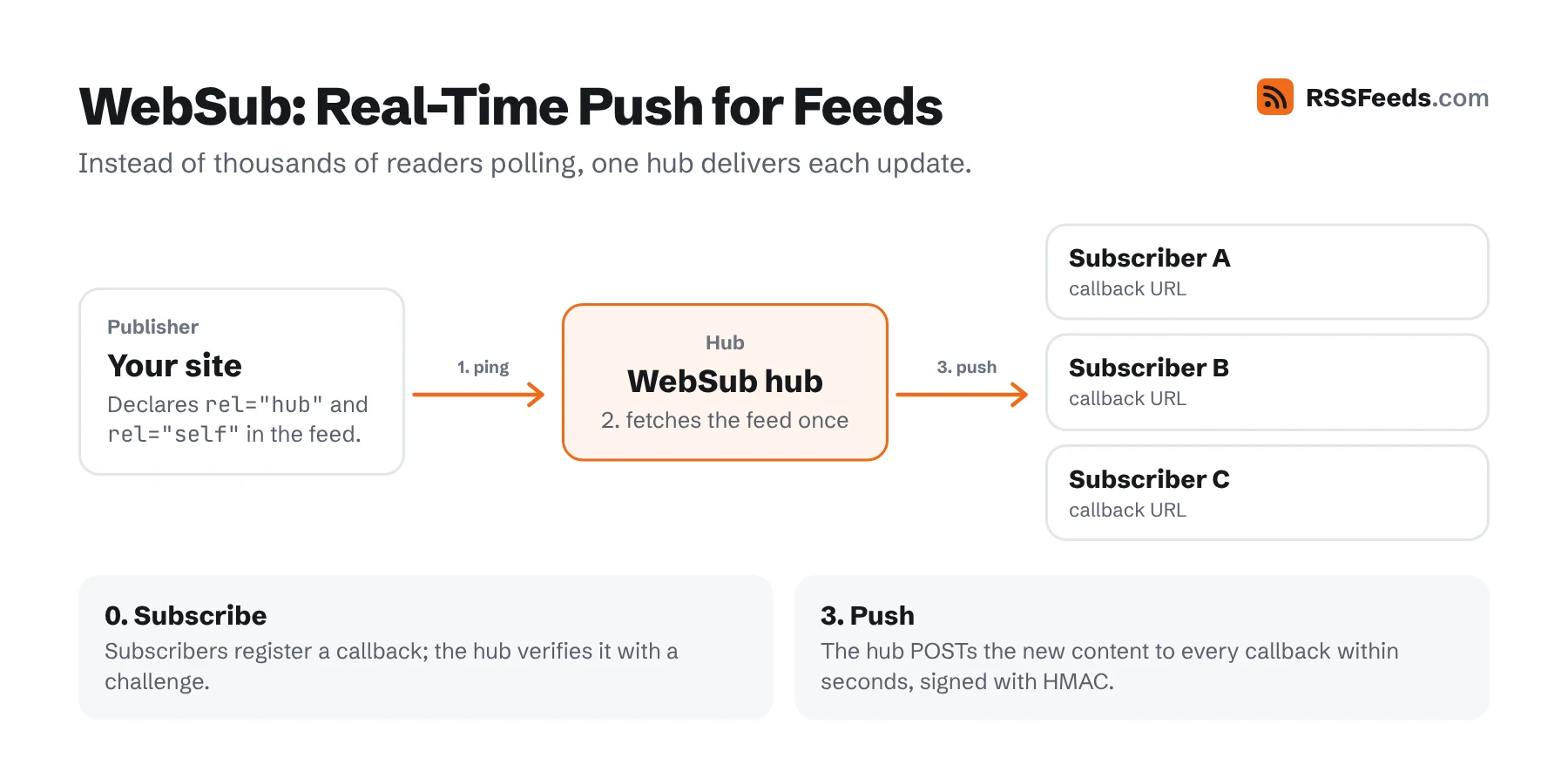
With polling, a thousand subscribers mean a thousand requests every interval, and still a delay of up to the polling interval. With push, the publisher notifies a hub once; the hub forwards the update to everyone who subscribed. Readers that support push can still poll occasionally as a fallback, so push is a pure gain.
Polling is fine for most blogs if you support conditional GET. Push matters when speed matters: news, live coverage, alerts, social timelines, podcast releases.
WebSub
WebSub is a W3C Recommendation since January 2018. It started in 2009 as PubSubHubbub, created at Google, and you'll still see that name in older software and hub URLs. YouTube uses it to notify apps about new videos.
The Three Roles
- Publisher: your site. It declares a hub in its feed and pings the hub when the feed changes.
- Hub: a server that keeps the list of subscribers and delivers updates. You can run one or use a public hub.
- Subscriber: a feed reader or service that wants updates. It gives the hub a callback URL.
Step 1: Declare the Hub
<!-- RSS -->
<atom:link rel="hub" href="https://pubsubhubbub.appspot.com/" />
<atom:link rel="self" href="https://example.com/feed.xml" type="application/rss+xml" />

<!-- Atom -->
<link rel="hub" href="https://pubsubhubbub.appspot.com/" />
<link rel="self" href="https://example.com/atom.xml" />
The self link is required: it is the "topic" subscribers subscribe to. You can also send the links as HTTP headers: Link: <https://hub.example/>; rel="hub". JSON Feed uses its hubs array.
Step 2: Ping the Hub When You Publish
curl -X POST https://pubsubhubbub.appspot.com/ \
  -d hub.mode=publish \
  -d hub.url=https://example.com/feed.xml
The hub then fetches your feed and sends the new content to every subscriber. How the publisher notifies the hub isn't fixed by the spec; this form-encoded POST is what nearly all public hubs accept. On WordPress, a WebSub plugin does it for you.
Step 3: How Subscribers Subscribe
- The subscriber sends
hub.mode=subscribe,hub.topic(the feed URL),hub.callbackand optionallyhub.lease_secondsandhub.secretto the hub. - The hub verifies the request by calling the callback with a
hub.challenge, which the subscriber must echo back. - On every update, the hub POSTs the new feed content to the callback, signed with an
X-Hub-SignatureHMAC if a secret was given. - Subscriptions expire after the lease and must be renewed.
rssCloud
rssCloud is the push mechanism built into RSS itself, through the <cloud> element added in RSS 0.92. A reader registers with the cloud server named in the feed; when the feed changes, the server notifies the reader, which then fetches the feed. It's older and simpler than WebSub and supported by WordPress.com and some readers, but WebSub is far more common.
<cloud domain="rpc.example.com" port="443" path="/pleaseNotify" registerProcedure="" protocol="http-post" />Podping
Podping was created by the Podcast Index community in 2021 for podcasts, where millions of feeds would otherwise be polled constantly. When a host publishes an episode, it sends a small notification ("this feed URL changed") to the Podping network, which broadcasts it through the Hive blockchain. Any app can listen to the stream and refresh only the feeds that actually changed. Feeds can signal support with <podcast:podping usesPodping="true"/>. Many podcast hosts send podpings automatically.
Comparison
| WebSub | rssCloud | Podping | |
|---|---|---|---|
| Standard | W3C Recommendation | Part of RSS 2.0 | Community protocol |
| Delivers content | Yes, the hub sends the feed | No, only a notification | No, only a notification |
| Works with | RSS, Atom, JSON Feed, any URL | RSS | Any feed, mostly podcasts |
| Subscriber needs | Public callback URL | Public callback URL | Reads a public stream |
| Used by | YouTube, blogs, Mastodon tooling, readers | WordPress.com, a few readers | Podcast hosts and apps |
Adding a hub to your feed costs two lines and no downside. Check that your feed declares it correctly with the Feed Validator.
Sources and Further Reading
- WebSubW3C Recommendation
- Google PubSubHubbub HubGoogle
- PodpingPodcast Index
- RSS 2.0 SpecificationRSS Advisory Board