How the Feed Finder Works
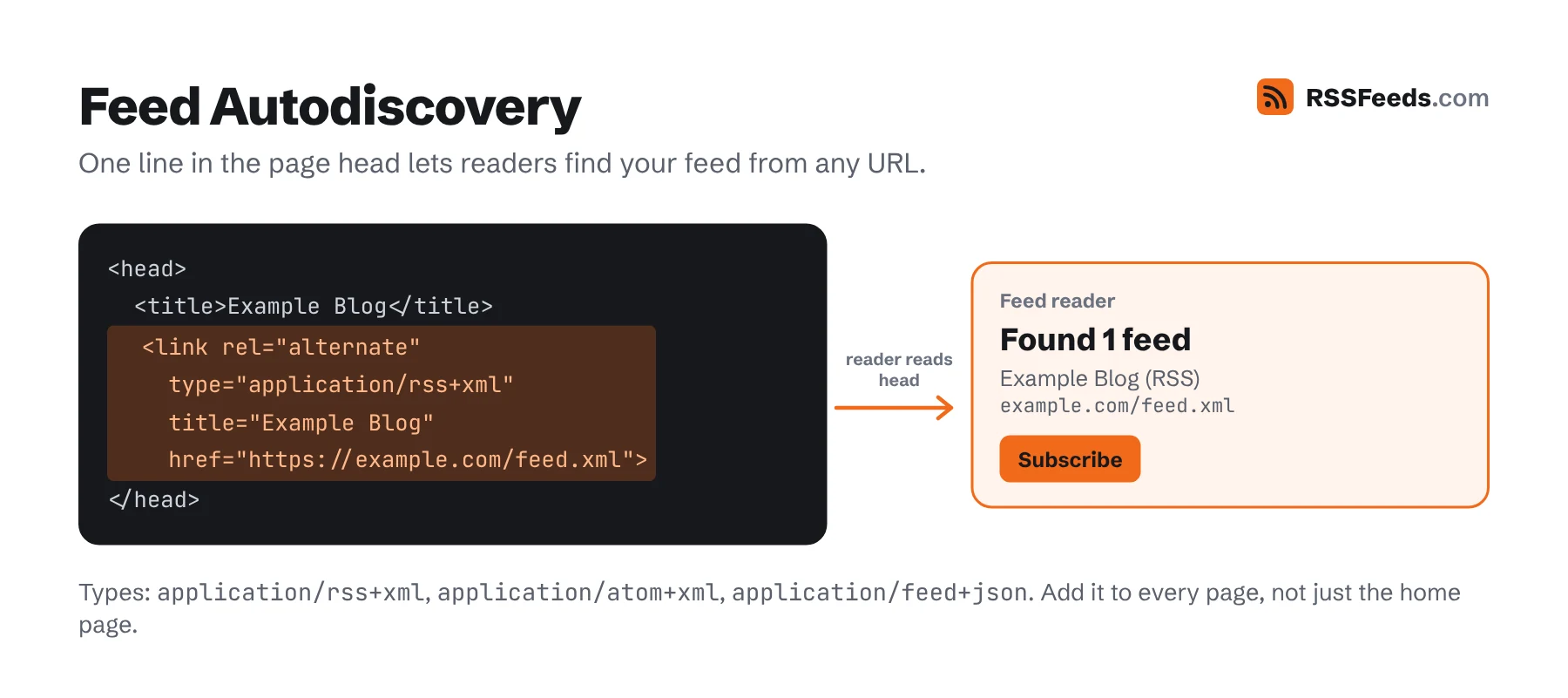
Most websites with a feed announce it in the <head> of their pages with an autodiscovery tag. The finder reads that first. If a site doesn't announce its feed, the finder looks for feed links on the page and then tries the addresses where content systems usually put their feed, like /feed, /rss.xml and /atom.xml. For platforms that hide their feeds – YouTube, Reddit, GitHub and others – it builds the address from the known URL pattern. Every result is fetched and checked, so you only get feeds that work.
RSS Feed URLs for Popular Platforms
Bookmark this cheat sheet. Replace the parts in capitals with your own values.
YouTube
Every channel has a feed of its 15 most recent uploads, but YouTube no longer shows a link to it. The feed needs the channel ID, which starts with UC; paste a channel URL or @handle into the finder to look it up.
| Channel | https://www.youtube.com/feeds/videos.xml?channel_id=CHANNEL_ID |
|---|---|
| Playlist | https://www.youtube.com/feeds/videos.xml?playlist_id=PLAYLIST_ID |
| Videos without Shorts | …?playlist_id=UULF + the channel ID without its leading UC |
| Shorts only | …?playlist_id=UUSH + the channel ID without UC |
Add .rss to almost any Reddit address.
| Subreddit | https://www.reddit.com/r/SUBREDDIT/.rss |
|---|---|
| Newest posts | https://www.reddit.com/r/SUBREDDIT/new/.rss |
| Top of the week | https://www.reddit.com/r/SUBREDDIT/top/.rss?t=week |
| User | https://www.reddit.com/user/USERNAME/.rss |
| Search | https://www.reddit.com/search.rss?q=KEYWORDS |
| Comments on a post | The post URL followed by .rss |
WordPress
Full guide: WordPress RSS feeds
| All posts | https://example.com/feed/ |
|---|---|
| Atom version | https://example.com/feed/atom/ |
| Category | https://example.com/category/SLUG/feed/ |
| Tag | https://example.com/tag/SLUG/feed/ |
| Author | https://example.com/author/NAME/feed/ |
| Search results | https://example.com/?s=KEYWORDS&feed=rss2 |
| Comments | https://example.com/comments/feed/ |
Blogs and Newsletters
| Substack | https://NAME.substack.com/feed |
|---|---|
| Medium author | https://medium.com/feed/@USERNAME |
| Medium publication | https://medium.com/feed/PUBLICATION |
| Medium tag | https://medium.com/feed/tag/TAG |
| Ghost | https://example.com/rss/ |
| Blogger | https://NAME.blogspot.com/feeds/posts/default (Atom) or add ?alt=rss |
| Tumblr | https://NAME.tumblr.com/rss |
| DEV | https://dev.to/feed/USERNAME |
| Squarespace | The blog page URL followed by ?format=rss |
| Wix | https://example.com/blog-feed.xml |
| Shopify blog | https://example.com/blogs/news.atom (use your blog's handle) |
Social Networks
| Mastodon profile | https://INSTANCE/@USERNAME.rss |
|---|---|
| Mastodon hashtag | https://INSTANCE/tags/HASHTAG.rss |
| Bluesky profile | https://bsky.app/profile/HANDLE/rss (original posts, no replies or reposts) |
| Letterboxd | https://letterboxd.com/USERNAME/rss/ |
| X, Instagram, Facebook, TikTok, LinkedIn | No official feeds. Only third-party services or the open-source, self-hosted RSSHub can create them, and they break when the platforms change. |
Developers and Research
| GitHub releases | https://github.com/OWNER/REPO/releases.atom |
|---|---|
| GitHub tags | https://github.com/OWNER/REPO/tags.atom |
| GitHub commits | https://github.com/OWNER/REPO/commits/BRANCH.atom |
| GitHub user activity | https://github.com/USERNAME.atom |
| Stack Overflow tag | https://stackoverflow.com/feeds/tag/TAG |
| Hacker News | https://news.ycombinator.com/rss |
| arXiv category | https://rss.arxiv.org/rss/CATEGORY, e.g. cs.AI; combine with + |
| Discourse forum | https://FORUM/latest.rss and https://FORUM/posts.rss |
News Searches and Podcasts
Full guide: Google News RSS feeds
| Google News search | https://news.google.com/rss/search?q=KEYWORDS&hl=en-US&gl=US&ceid=US:en |
|---|---|
| Apple Podcasts show | Paste the podcasts.apple.com link into the finder; it looks up the original feed in Apple's directory. |
| Spotify | Spotify doesn't publish feed URLs. Most shows on Spotify also have a public feed at their hosting provider; search for the show in the Apple directory. |
Finding a Feed by Hand
- Open the website and view the page source (Ctrl+U or ⌘+⌥+U).
- Search for
application/rss+xml,application/atom+xmlorapplication/feed+json. Thehrefnext to it is the feed. - No luck? Look for an orange feed icon or a link called RSS, Feed or Subscribe in the footer.
- Try adding
/feed,/rss,/feed.xmlor/index.xmlto the site address.
What if a Website Has No Feed?
Ask the owner – adding a feed is usually one setting away, and our guide to creating a feed explains how. Otherwise, many feed readers can watch a page for changes, and Inoreader and Feedbin can turn email newsletters into feeds. As a publisher, make sure your own site is found by adding autodiscovery; see the publisher best practices.