
JSON Feed at a Glance
| Current version | 1.1 (August 2020), version string https://jsonfeed.org/version/1.1 |
|---|---|
| Specification | jsonfeed.org/version/1.1 |
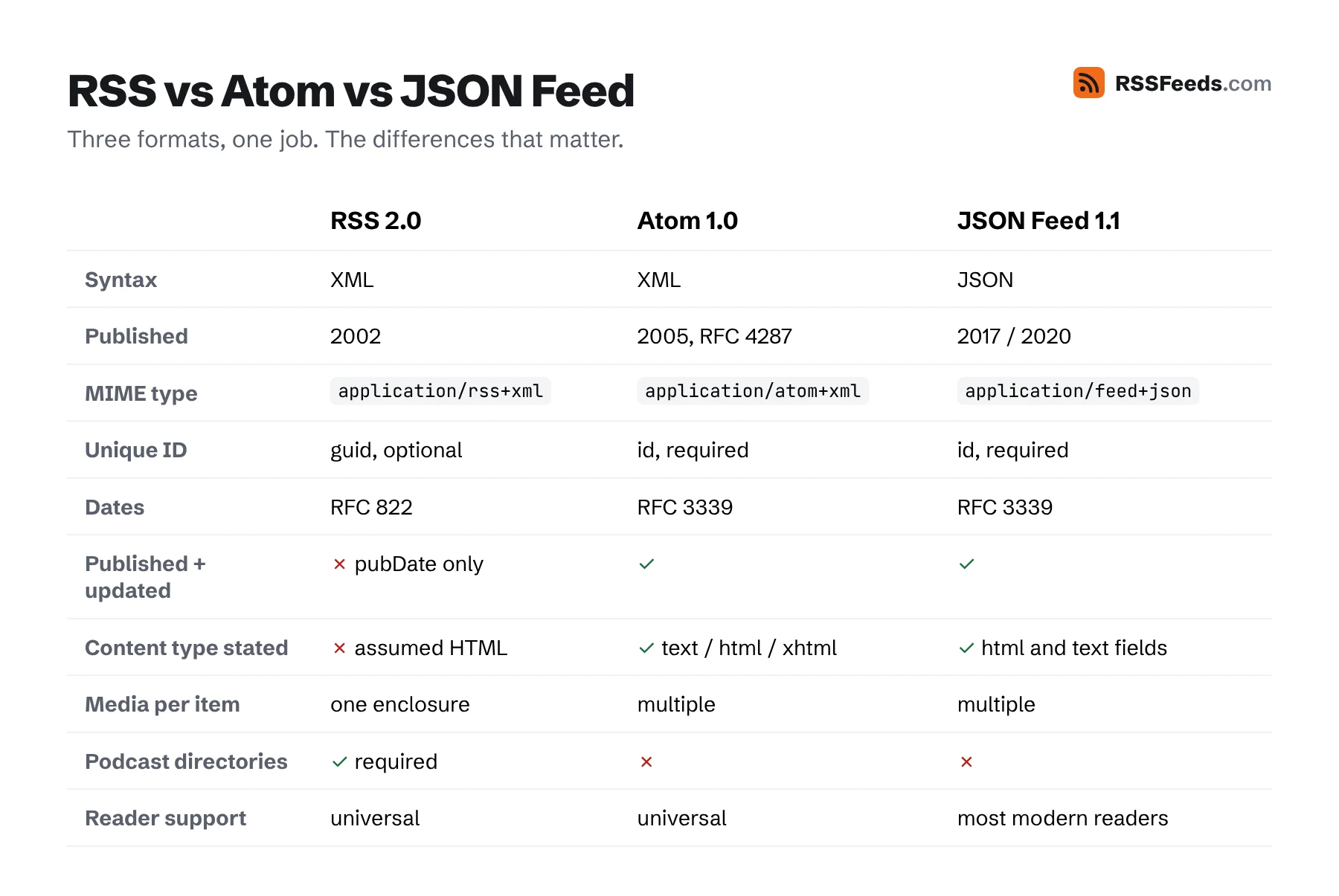
| MIME type | application/feed+json (1.0 used application/json) |
| Date format | RFC 3339, e.g. 2026-11-11T09:00:00+01:00 |
| Extensions | Any key starting with an underscore, such as _myapp |
A Minimal JSON Feed
{
  "version": "https://jsonfeed.org/version/1.1",
  "title": "Example Blog",
  "home_page_url": "https://example.com/",
  "feed_url": "https://example.com/feed.json",
  "items": [
    {
      "id": "https://example.com/why-feeds-matter",
      "url": "https://example.com/why-feeds-matter",
      "title": "Why feeds still matter",
      "content_html": "<p>The full article.</p>",
      "date_published": "2026-11-11T09:00:00Z"
    }
  ]
}
Top-Level Fields
| Field | Description | |
|---|---|---|
version | required | The URL of the version of the spec: https://jsonfeed.org/version/1.1. |
title | required | The name of the feed. |
items | required | An array of items. May be empty. |
home_page_url | recommended | The website the feed belongs to. |
feed_url | recommended | The URL of the feed itself, so readers can find it again if it moves. |
description | optional | More detail about the feed. |
user_comment | optional | A note for people who open the file, e.g. "This is a feed. Use a feed reader." |
next_url | optional | URL of the next page, for paginated feeds. |
icon | optional | A large square image, at least 512×512, for use in timelines. |
favicon | optional | A small square image, for use in source lists. |
authors | optional | Array of author objects with name, url and avatar. New in 1.1. |
language | optional | Language tag, e.g. en-US. New in 1.1. |
expired | optional | true if the feed will never be updated again. |
hubs | optional | Array of {"type": "WebSub", "url": "…"} objects for real-time notifications. |
Item Fields
| Field | Description | |
|---|---|---|
id | required | Unique, permanent ID. A string; the URL is a fine choice. |
content_html / content_text | one required | The content as HTML, as plain text, or both. |
url | recommended | The permalink of the item. |
external_url | optional | For link posts: the page the item is about. |
title | optional | Leave out for microblog posts without titles. |
summary | optional | A plain-text summary. |
image | optional | The main image of the item. |
banner_image | optional | An image to show at the top of the item. |
date_published, date_modified | recommended | RFC 3339 dates. |
authors | optional | Same structure as the top-level authors. |
tags | optional | Array of strings. |
language | optional | Language of this item, if it differs from the feed. |
attachments | optional | Array of files, see below. |
Attachments and Podcasts
"attachments": [
  {
    "url": "https://example.com/audio/episode-42.mp3",
    "mime_type": "audio/mpeg",
    "title": "Episode 42",
    "size_in_bytes": 48211968,
    "duration_in_seconds": 3012
  }
]
url and mime_type are required. Unlike RSS, an item can have several attachments, for example the same episode in MP3 and AAC. Note that Apple Podcasts and most podcast directories only accept RSS, so podcasters should publish RSS (and may add JSON Feed alongside).
What Changed in Version 1.1
authors(an array) replacesauthor, so items can have several authors. Keepauthoras well if you want to support old readers.- New
languagefield on the feed and on items. - The MIME type
application/feed+jsonwas introduced. - Clarifications throughout the spec, for example that item IDs must be strings.
Generating JSON Feed in PHP
<?php
$posts = $pdo->query('SELECT slug, title, body, published_at FROM posts ORDER BY published_at DESC LIMIT 20')->fetchAll(PDO::FETCH_ASSOC);
header('Content-Type: application/feed+json; charset=utf-8');
echo json_encode([
    'version' => 'https://jsonfeed.org/version/1.1',
    'title' => 'Example Blog',
    'home_page_url' => 'https://example.com/',
    'feed_url' => 'https://example.com/feed.json',
    'items' => array_map(fn($p) => [
        'id' => 'https://example.com/posts/' . $p['slug'],
        'url' => 'https://example.com/posts/' . $p['slug'],
        'title' => $p['title'],
        'content_html' => $p['body'],
        'date_published' => date(DATE_ATOM, strtotime($p['published_at'])),
    ], $posts),
], JSON_PRETTY_PRINT | JSON_UNESCAPED_SLASHES | JSON_UNESCAPED_UNICODE);
No escaping or CDATA: json_encode takes care of everything. Compare that with the RSS version in How to Create an RSS Feed.
Who Supports JSON Feed?
Many modern readers, including NetNewsWire and Feedbin, read JSON Feed natively, and Micro.blog publishes it. Support in older readers, aggregators, email tools and automation platforms is less complete than for RSS, which is why most publishers offer JSON Feed next to RSS. Our Feed Converter and API read JSON Feed everywhere.
Publishing a JSON Feed
Serve the file with Content-Type: application/feed+json and announce it in the page head:
<link rel="alternate" type="application/feed+json" title="Example Blog" href="https://example.com/feed.json">Generating JSON Feed is trivial in any language: build an array and encode it. You never need to escape XML or wrap HTML in CDATA. Many publishers offer JSON Feed next to RSS rather than instead of it. Convert an existing feed with the Feed Converter and check the result with the Feed Validator.
Sources and Further Reading
- JSON Feed Version 1.1jsonfeed.org
- JSON Feedjsonfeed.org
- RFC 8259: The JavaScript Object Notation (JSON) Data Interchange FormatIETF