RSS 2.0 at a Glance
| Full name | Really Simple Syndication |
|---|---|
| Current version | RSS 2.0 (specification revision 2.0.11, 2009) |
| Maintained by | RSS Advisory Board, rssboard.org |
| File format | XML 1.0, usually UTF-8 |
| MIME type | application/rss+xml (also accepted: application/xml, text/xml) |
| Date format | RFC 822, e.g. Wed, 11 Nov 2026 09:00:00 +0000 |
| Extensible | Yes, through XML namespaces (content, dc, media, itunes, atom …) |
The specification has been frozen since 2003: new features are added through namespaces, not by changing RSS itself. That stability is why a feed written in 2005 still works in every reader today.
Structure of an RSS Feed
An RSS document has three levels: the <rss> root with a version="2.0" attribute, exactly one <channel> describing the feed, and any number of <item> elements inside the channel, one per article, episode or update.
<?xml version="1.0" encoding="UTF-8"?>
<rss version="2.0" xmlns:atom="http://www.w3.org/2005/Atom">
  <channel>
    <title>Example Blog</title>
    <link>https://example.com/</link>
    <description>Notes about the web.</description>
    <atom:link href="https://example.com/feed.xml" rel="self" type="application/rss+xml" />
    <language>en-us</language>
    <lastBuildDate>Wed, 11 Nov 2026 09:00:00 +0000</lastBuildDate>

    <item>
      <title>Why feeds still matter</title>
      <link>https://example.com/why-feeds-matter</link>
      <guid isPermaLink="true">https://example.com/why-feeds-matter</guid>
      <pubDate>Wed, 11 Nov 2026 09:00:00 +0000</pubDate>
      <description>A short summary of the article.</description>
    </item>
  </channel>
</rss>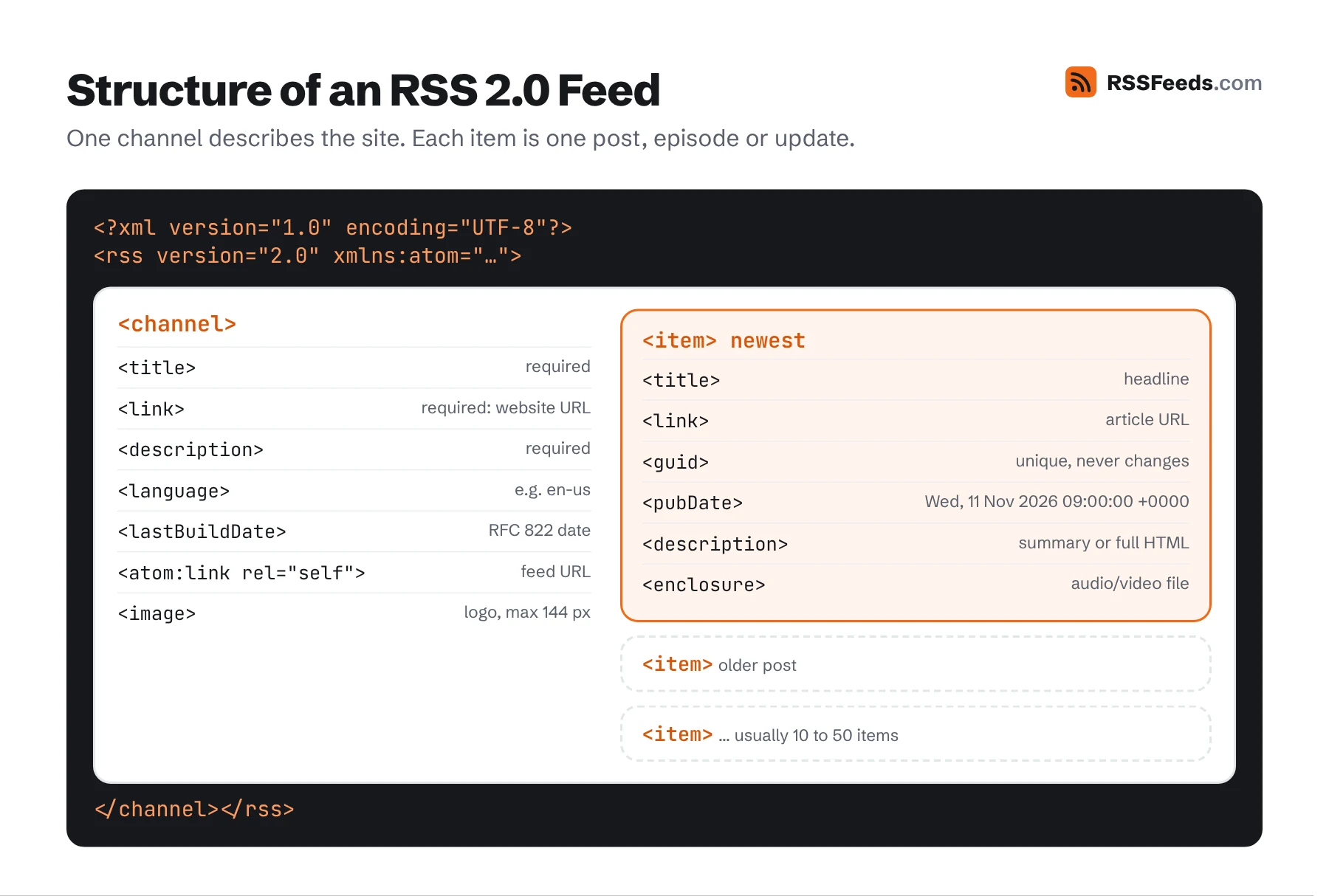
Channel Elements
Three channel elements are required. Everything else is optional, but some optional elements are strongly recommended.
| Element | Description and example | |
|---|---|---|
title | required | The name of the feed, usually the site name. <title>Example Blog</title> |
link | required | The URL of the website the feed belongs to – not the feed itself. Must be absolute. |
description | required | A phrase or sentence describing the channel. |
language | recommended | Language code, such as en, en-us, nl or de-at. Required by Apple Podcasts. |
copyright | optional | Copyright notice: © 2026 Example Inc. |
managingEditor | optional | Email of the person responsible for content: editor@example.com (Jane Doe) |
webMaster | optional | Email of the person responsible for technical issues, same format. |
pubDate | optional | Publication date of the content, in RFC 822 format. |
lastBuildDate | recommended | The last time the content of the feed changed, in RFC 822 format. |
category | optional | One or more categories. Optional domain attribute names a taxonomy. May repeat. |
generator | optional | The software that made the feed: WordPress 6.8. |
docs | optional | URL of the RSS specification, for people who find the file and wonder what it is: https://www.rssboard.org/rss-specification |
cloud | optional | Registers for rssCloud push notifications. See real-time feeds. |
ttl | optional | "Time to live": number of minutes a reader may cache the feed. <ttl>60</ttl> |
image | optional | A small logo shown with the feed. Has child elements, see below. |
rating | obsolete | A PICS content rating. PICS is no longer used. |
textInput | obsolete | A text box shown with the feed, e.g. a search form. Almost no reader supports it. |
skipHours | optional | Up to 24 <hour> elements (0–23, GMT) in which readers should not check the feed. |
skipDays | optional | Up to 7 <day> elements (Monday … Sunday) on which readers should not check. |
The image Element
<image>
  <url>https://example.com/logo-88.png</url>
  <title>Example Blog</title>
  <link>https://example.com/</link>
  <width>88</width>
  <height>31</height>
</image>url, title and link are required; in practice title and link should match the channel's. width may be at most 144 pixels (default 88) and height at most 400 (default 31). Use GIF, JPEG or PNG. For large artwork, such as podcast covers, use itunes:image instead.
The cloud Element
<cloud domain="rpc.example.com" port="80" path="/RPC2" registerProcedure="pingMe" protocol="xml-rpc" />All five attributes are required. protocol is xml-rpc, soap or http-post. Today most publishers use WebSub instead.
Item Elements
All item elements are optional, but every item must contain at least a title or a description. In practice you should always include title, link, guid, pubDate and description.
| Element | Description | |
|---|---|---|
title | recommended | The headline. Plain text; HTML tags will show literally in most readers. |
link | recommended | Absolute URL of the full item on the web. |
description | recommended | A summary or the full text. HTML is allowed when escaped or wrapped in CDATA. |
author | optional | Email address of the author: jane@example.com (Jane Doe). To show only a name, use dc:creator. |
category | optional | Category or tag. May repeat. Optional domain attribute. |
comments | optional | URL of the comments page. |
enclosure | optional | An attached media file. Required for podcast episodes. See below. |
guid | recommended | A string that uniquely identifies the item forever. See below. |
pubDate | recommended | When the item was published, RFC 822. Future dates may hide the item until then. |
source | optional | The feed the item came from, for aggregated feeds: <source url="https://other.example/feed.xml">Other Blog</source> |
guid and isPermaLink
The guid is how readers know whether an item is new. It must never change – not when you edit the title, not when you move to new software. The isPermaLink attribute defaults to true, which means the guid itself is a URL that can be opened. If your guid is anything else, say so:
<guid isPermaLink="true">https://example.com/posts/hello-world</guid>
<guid isPermaLink="false">post-1842</guid>
<guid isPermaLink="false">tag:example.com,2026:post-1842</guid>
Changing guids is the number one cause of "all my posts show up as new again" complaints. When you migrate a site, keep the old guids, even if the URLs change.
enclosure
<enclosure url="https://example.com/audio/episode-42.mp3" length="48211968" type="audio/mpeg" />All three attributes are required. length is the file size in bytes – use 0 only if you truly can't know it. type is the MIME type: audio/mpeg for MP3, audio/x-m4a for M4A, video/mp4 for MP4, image/jpeg for photos. The spec doesn't say whether an item may have more than one enclosure; most software only uses the first, so don't rely on more.
HTML in description
RSS has no attribute that says whether content is HTML or text; readers assume description may contain HTML. Include it in one of two ways:
<description><p>Hello <strong>world</strong></p></description>
<description><![CDATA[<p>Hello <strong>world</strong></p>]]></description>CDATA is easier to read. The only sequence you can't put inside CDATA is ]]>; split it as ]]]]><![CDATA[>. Use absolute URLs for every link and image, and put the full article in content:encoded if description holds a summary.
Date Format
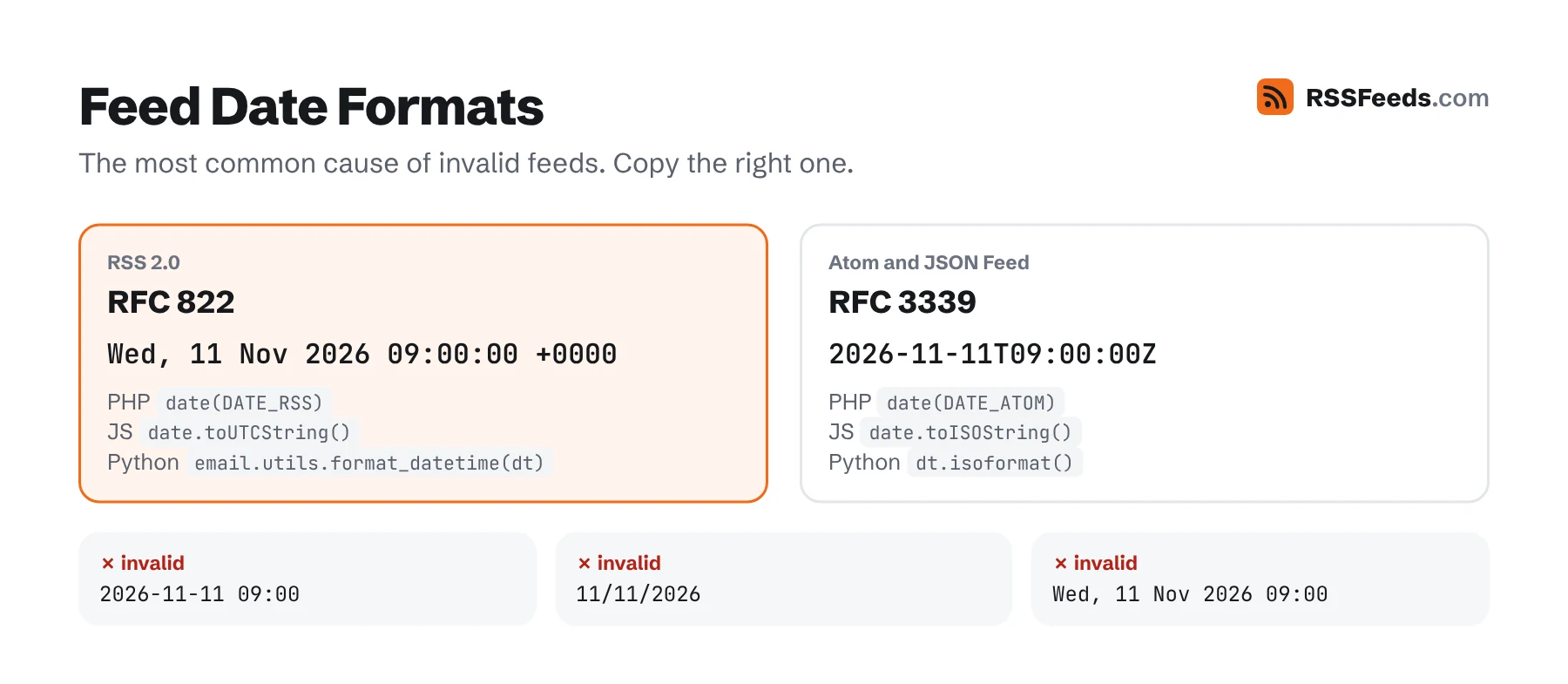
RSS uses the date format of RFC 822 (the old email standard), with a four-digit year:
Wed, 11 Nov 2026 09:00:00 +0000
Wed, 11 Nov 2026 10:00:00 +0100
Wed, 11 Nov 2026 09:00:00 GMT
The weekday is optional but must be correct when present. Day and month names are always English. Prefer a numeric offset like +0000 over zone names. Formats such as 2026-11-11 or 11/11/2026 are invalid. In code:
| PHP | date(DATE_RSS, $timestamp) |
|---|---|
| JavaScript | new Date().toUTCString() (gives "GMT" as zone) |
| Python | email.utils.format_datetime(dt) |
| Ruby | time.rfc2822 |
| C# | dt.ToString("r") |
| Go | t.Format(time.RFC1123Z) |
Extending RSS with Namespaces
Any element that isn't part of RSS 2.0 must live in a namespace declared on the root element. The most common extensions:
<rss version="2.0"
  xmlns:atom="http://www.w3.org/2005/Atom"
  xmlns:content="http://purl.org/rss/1.0/modules/content/"
  xmlns:dc="http://purl.org/dc/elements/1.1/"
  xmlns:media="http://search.yahoo.com/mrss/"
  xmlns:itunes="http://www.itunes.com/dtds/podcast-1.0.dtd">
See Namespaces and Extensions for every common extension, and Podcast RSS for podcast tags.
Complete Example
<?xml version="1.0" encoding="UTF-8"?>
<rss version="2.0"
  xmlns:atom="http://www.w3.org/2005/Atom"
  xmlns:content="http://purl.org/rss/1.0/modules/content/"
  xmlns:dc="http://purl.org/dc/elements/1.1/"
  xmlns:media="http://search.yahoo.com/mrss/">
  <channel>
    <title>Field Notes</title>
    <link>https://example.com/</link>
    <description>Essays on slow travel, maps and small towns.</description>
    <atom:link href="https://example.com/feed.xml" rel="self" type="application/rss+xml" />
    <language>en-us</language>
    <copyright>© 2026 Field Notes</copyright>
    <lastBuildDate>Tue, 10 Nov 2026 08:30:00 +0000</lastBuildDate>
    <generator>Hand-written</generator>
    <docs>https://www.rssboard.org/rss-specification</docs>
    <ttl>60</ttl>
    <image>
      <url>https://example.com/logo.png</url>
      <title>Field Notes</title>
      <link>https://example.com/</link>
    </image>
    <item>
      <title>Reading a Topographic Map in Ten Minutes</title>
      <link>https://example.com/posts/topographic-maps</link>
      <guid isPermaLink="true">https://example.com/posts/topographic-maps</guid>
      <pubDate>Tue, 10 Nov 2026 08:30:00 +0000</pubDate>
      <dc:creator>Mara Lindqvist</dc:creator>
      <category>Maps</category>
      <comments>https://example.com/posts/topographic-maps#comments</comments>
      <description>Contour lines look like fingerprints until you know three simple rules.</description>
      <content:encoded><![CDATA[
        <p>Contour lines look like fingerprints until you know three simple rules.</p>
        <p><img src="https://example.com/img/topo.jpg" alt="A map on a table"></p>
      ]]></content:encoded>
      <media:thumbnail url="https://example.com/img/topo-400.jpg" width="400" height="260" />
    </item>
  </channel>
</rss>
Check your own feed with the Feed Validator, or build one with the Feed Generator.
RSS 2.0 Compared with Earlier Versions
RSS 2.0 is backward compatible with RSS 0.91 and 0.92: every valid 0.91 feed is a valid 2.0 feed once you change the version number. Compared with 0.91, RSS 2.0 added guid, comments, author, ttl, namespaces and the optional status of most elements, and dropped the 15-item limit. RSS 1.0 is a separate, RDF-based branch; see RSS 1.0 and RSS 0.9x.
Sources and Further Reading
- RSS 2.0 SpecificationRSS Advisory Board
- RSS Best Practices ProfileRSS Advisory Board
- RSS 2.0 at Harvard LawBerkman Klein Center
- RFC 822: Standard for the Format of ARPA Internet Text Messages (dates)IETF