How Podcast Feeds Work
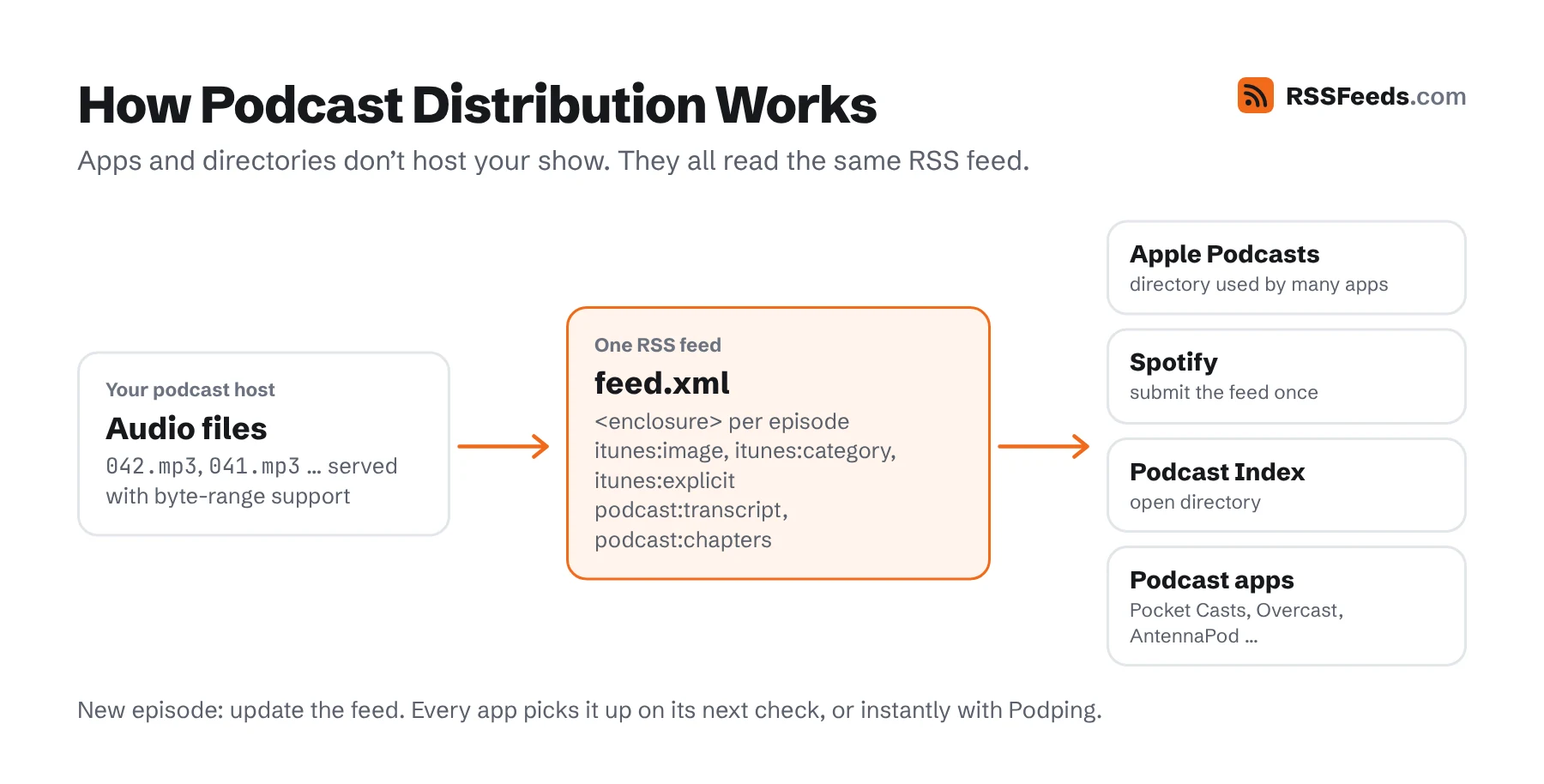
A podcast feed is an ordinary RSS 2.0 feed with two additions: each item has an <enclosure> pointing to the audio or video file, and the feed uses the itunes namespace for show artwork, categories and episode details. Podcast apps check the feed regularly and download new episodes. Directories like Apple Podcasts and Spotify don't host your audio; they read your feed.
That's why podcasting is still an open system: you can change hosts, apps can't lock listeners in, and anyone can build a player.
A Complete Podcast Feed
<?xml version="1.0" encoding="UTF-8"?>
<rss version="2.0"
  xmlns:itunes="http://www.itunes.com/dtds/podcast-1.0.dtd"
  xmlns:podcast="https://podcastindex.org/namespace/1.0"
  xmlns:atom="http://www.w3.org/2005/Atom"
  xmlns:content="http://purl.org/rss/1.0/modules/content/">
  <channel>
    <title>The Workshop Hour</title>
    <link>https://podcast.example.com/</link>
    <description>Conversations with people who make things by hand.</description>
    <atom:link href="https://podcast.example.com/feed.xml" rel="self" type="application/rss+xml" />
    <language>en</language>
    <copyright>© 2026 Workshop Media</copyright>
    <itunes:author>Workshop Media</itunes:author>
    <itunes:image href="https://podcast.example.com/cover-3000.jpg" />
    <itunes:category text="Arts">
      <itunes:category text="Design" />
    </itunes:category>
    <itunes:explicit>false</itunes:explicit>
    <itunes:type>episodic</itunes:type>
    <itunes:owner>
      <itunes:name>Workshop Media</itunes:name>
      <itunes:email>podcast@example.com</itunes:email>
    </itunes:owner>
    <podcast:locked>yes</podcast:locked>
    <podcast:guid>2f1c7a50-9d1e-5e4b-8c1a-1f2e3d4c5b6a</podcast:guid>

    <item>
      <title>The Chair That Took a Year</title>
      <description>Furniture maker Ilse de Vries on patience, oak and failure.</description>
      <guid isPermaLink="false">workshop-hour-042</guid>
      <pubDate>Mon, 09 Nov 2026 05:00:00 +0000</pubDate>
      <enclosure url="https://cdn.example.com/042.mp3" length="48211968" type="audio/mpeg" />
      <itunes:duration>3012</itunes:duration>
      <itunes:episode>42</itunes:episode>
      <itunes:season>3</itunes:season>
      <itunes:episodeType>full</itunes:episodeType>
      <itunes:explicit>false</itunes:explicit>
      <podcast:transcript url="https://podcast.example.com/042.vtt" type="text/vtt" />
      <podcast:chapters url="https://podcast.example.com/042.json" type="application/json+chapters" />
    </item>
  </channel>
</rss>
Show-Level Tags
| Tag | Apple | Notes |
|---|---|---|
title | required | The show name. Don't stuff keywords into it. |
description | required | Up to 4000 characters. Basic HTML links are allowed when wrapped in CDATA. |
itunes:image | required | href attribute with the cover art: square JPEG or PNG, 1400×1400 to 3000×3000 pixels, RGB. |
language | required | ISO 639 code, e.g. en or nl. |
itunes:category | required | text attribute with an Apple category; nest one subcategory. Escape ampersands: Health & Fitness. |
itunes:explicit | required | true or false. |
itunes:author | recommended | The creator or network shown under the title. |
link | recommended | The show's website. |
itunes:owner | recommended | itunes:name and itunes:email. Used to contact you and, by some services, to verify ownership. |
itunes:type | recommended | episodic (newest first) or serial (listen in order, e.g. a story). |
itunes:title | optional | Show title without extra text, if title contains more. |
copyright | optional | Copyright notice. |
itunes:new-feed-url | situational | When you move hosts: put the new feed URL here in the old feed and set up a 301 redirect. |
itunes:block | situational | Yes hides the show from Apple Podcasts. |
itunes:complete | situational | Yes marks the show as finished; no new episodes will come. |
Episode-Level Tags
| Tag | Apple | Notes |
|---|---|---|
title | required | The episode title, without the show name or episode number. |
enclosure | required | url, length in bytes and type. Apple supports M4A, MP3, MOV, MP4, M4V and PDF. |
guid | recommended | Never change it, or apps will download the episode again. |
pubDate | recommended | RFC 822 date. Episodes with a future date may stay hidden until then. |
description | recommended | Show notes. Use content:encoded for rich HTML. |
itunes:duration | recommended | Length in seconds (3012) or HH:MM:SS. |
itunes:image | optional | Episode-specific artwork, same rules as the show artwork. |
itunes:explicit | optional | Overrides the show setting for this episode. |
itunes:episode, itunes:season | optional | Positive whole numbers. Required in practice for serial shows. |
itunes:episodeType | optional | full (default), trailer or bonus. |
itunes:title | optional | A clean episode title, if title contains extra text. |
itunes:block | optional | Yes hides a single episode from Apple Podcasts. |
Deprecated tags: itunes:summary, itunes:subtitle and itunes:keywords are no longer used by Apple. description is the place for show notes. Feeds with these tags still work.
Hosting Requirements
- Byte-range requests. Your media server must support HTTP
Rangerequests andHEAD; Apple requires it for streaming and seeking. - Stable URLs. Don't change audio URLs after publishing, and keep the feed URL forever. Use a redirect plus
itunes:new-feed-urlwhen you must move. - Correct sizes. The
lengthattribute should match the actual file size in bytes. - HTTPS for the feed, the artwork and the media files.
- Speed. Serve media from a CDN; a slow first byte means listeners skip.
The Podcasting 2.0 Namespace
The podcast namespace (https://podcastindex.org/namespace/1.0), developed in the open by the Podcast Index community since 2020, adds features the iTunes tags never had. Support differs per app, but transcripts and chapters are now widely supported.
| Tag | Purpose |
|---|---|
podcast:transcript | Link to a transcript (VTT, SRT, JSON or HTML). Improves accessibility and search. |
podcast:chapters | Link to a JSON chapters file with titles, start times, images and links. |
podcast:locked | yes tells other platforms not to import the feed without your permission. |
podcast:guid | A permanent, global ID for the show, a UUIDv5 based on the feed URL. Survives moves between hosts. |
podcast:funding | Link to a donation or membership page. |
podcast:person | Hosts and guests, with role, image and link. |
podcast:soundbite | Highlights for previews, with start time and duration. |
podcast:season, podcast:episode | Season and episode with optional names. |
podcast:trailer | Show-level trailers. |
podcast:location | The place a show or episode is about. |
podcast:license | The license of the content, e.g. a Creative Commons license. |
podcast:alternateEnclosure | The same episode in other formats or bitrates, including video. |
podcast:medium | What the feed is: podcast, music, video, audiobook, newsletter … |
podcast:value | Payment details for listener micropayments ("value for value"). |
podcast:liveItem | Announce live streams. |
podcast:podping, podcast:updateFrequency | Real-time update notifications and the expected publishing schedule. |
Podping is a notification network that tells apps instantly when a feed changes, instead of having thousands of apps poll it; see real-time feeds.
Submitting Your Podcast
- Publish the feed at a permanent HTTPS URL and check it with the Feed Validator – it includes Apple's requirements.
- Submit the feed URL to Apple Podcasts Connect, Spotify's creator portal and the Podcast Index. Most other apps get their catalogue from the Apple directory or the Podcast Index.
- Publish at least one episode before you submit; some directories reject empty feeds.
No feed yet? The Feed Generator creates a valid podcast feed from a form.
Podcast Feed Questions
Why doesn't my new episode show up?
Directories refresh feeds on their own schedule, from minutes to a day. Check that the episode has a new, unique guid, a pubDate that isn't in the future, and a working enclosure URL with the right length.
Can I make a private podcast?
Yes: give each listener a unique, unguessable feed URL, block the show in directories with itunes:block and add podcast:locked. Most podcast hosts offer this as "private feeds".
What bitrate should I use?
For speech, MP3 at 96–128 kbps mono or 128 kbps stereo is common. The length attribute must reflect the final file.
Sources and Further Reading
- Podcast RSS Feed RequirementsApple Podcasts for Creators
- The Podcast NamespacePodcast Index
- Podcasting 2.0Podcast Index
- RSS 2.0 SpecificationRSS Advisory Board